A good letterhead does two jobs: it tells the reader who you are at a glance, and it makes every document you send look trustworthy. The good news is that you don’t need design software or a designer to make one. Here’s how to do it well in a few minutes.
1. Collect your details first
Before you think about colours, write down exactly what must appear. Getting this right first saves you from re-doing the layout later.
- Your business or organisation name, exactly as registered
- A short tagline or what you do (for example “Pathology & Diagnostic Centre”)
- Full address with PIN code
- Phone number and email address
- Registration details that apply to you — GSTIN, CIN, licence or registration number
- Your logo, ideally as a PNG or SVG with a transparent background
2. Pick a layout that matches your field
Clinics and labs usually look best with clean, calm layouts and plenty of white space. Shops and restaurants can carry bolder colour. Corporate departments tend to prefer a restrained design with a single accent colour. Choose a starting design that already feels right for your industry — it is much easier to adjust a good layout than to build one from nothing.
3. Keep the header short and the footer useful
Put your name, logo and tagline in the header, where people look first. Move secondary information — address, registration numbers, a signature line or a short note — to the footer. This keeps the top of the page uncluttered and leaves more room for the actual letter.
4. Choose one accent colour
One strong brand colour plus dark grey text looks more professional than several competing colours. If you have a logo, take the accent colour from it so everything feels connected.
5. Check it the way it will be used
- Preview it on a full page, not just the header on its own.
- Print one copy on the paper size you actually use (A4 in most of India).
- Check that small text — especially registration numbers — is readable when printed.
6. What a finished one looks like
Put together, those five steps produce something like the quotation below: a short header with the name and a single accent colour, a plain reference number and date line, an uncluttered work table doing the actual job of the page, and the registration numbers kept quiet in the footer rather than competing with the content.
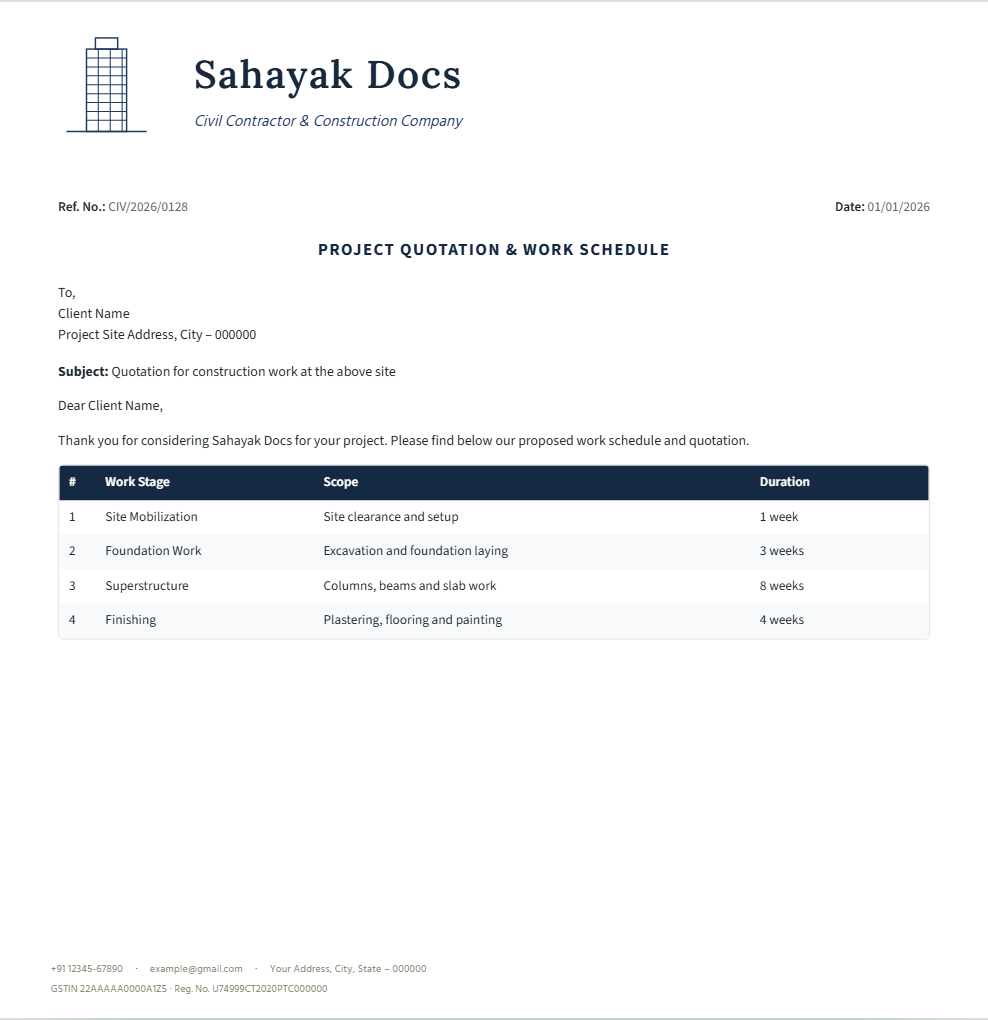
In Sahayak Docs you can pick a design, fill in your details, fine-tune anything in Create your own, and download the header, footer or a full letter pad as PDF — free.
Frequently asked questions
Do I need design software or a designer to make a letterhead?
No — pick a ready-made design for your industry in Sahayak Docs, add your own name, logo and details, and download it. There’s nothing to install and no account to create.
Should I download a PNG or a PDF?
Download the header and footer as PNGs if you’ll place them into Word or Google Docs yourself — see “How to use your letterhead in Word and Google Docs”. Download the full letter pad as PDF if you want ready-to-print pages with your branding already in place.
Can I switch designs later without starting over?
Yes — your details carry over if you pick a different industry design, and you can open any design in Create your own to move or restyle individual elements without losing what you’ve already filled in.